This assignment helps you get familiar with writing HTML and CSS code. You are asked to create a very simple webpage. In the first question, you are to write a plain HTML file and then add style according to question 2.
Note that even though what was taught in the lectures is enough "knowledge" to cover this assignment, it is quite possible that some specific tags, styles, or tricks are not covered in the lecture. There are millions of features in web programming, and it is really impossible to teach them all in a lecture.
Therefore, you are welcome to refer to the slides or online resources to lookup for specific things. However, please be mindful that you will not violate academic integrity, as explained later.
- This assignment will make up 10% of your final grade.
- The due date is Friday, January 28th at 23:59:00. Late submissions will incur a 15% penalty per day for a maximum of 3 days.
- If you have any questions or problems with the assignment, please post them on Piazza.
- It is recommended that you test your code on Firefox (95 or above) or Google Chrome (96 or above). You might probably not want to risk it by using Internet Explorer, Opera, or other things.
- Most of your submissions will be auto-graded. Therefore, your code must adhere to all details provided in the handout; otherwise, you might lose marks.
- You will not receive any feedback from the auto grader before the deadline has passed. So it is your responsibility to double-check your code with the handout before submission. Even minor spelling mistakes can lead to loss of marks. No remark requests will be accepted on these matters.
- Only the last version of your repository will be graded. Make sure that your last commit is the one you would like to be graded. It will not be possible to ask for a checkout to a different commit.
You should submit your work to your git repository on Markus. That is, you cannot submit through its normal web interface. Instead, commit and push your codes to your repository for assignment 1. Find out your repo's URL by logging into Markus.
You must only submit a single HTML file named index.html and a stylesheet named
style.css.
Note that any other file you submit will be deleted by the auto tester.
Warning: Importing any online CSS or JS code is strictly forbidden and will result in losing all marks of the assignment. Examples are bootstrap, semantic, jquery, and any other code written by someone else.
Assignments are individual work which means that you will not be allowed to seek advice from other students or copy/paste someone else's code, even open-source codes from the internet. However, you are allowed to look at online resources, tutorials, and Q&A websites to solve the problems. The entire code must be written by yourself.
Write an HTML file named index.html that includes the following:
- "CSC309 Personal Website" as title
- "Hello Visitors!" directly in a <div> section
- Your name in an <h1> and your UTorID in an <h2>
- An unordered list that includes the exact following text:
• A1 is worth 10%.
• A2 is worth 15%.
• A3 is worth 15%.
- A widget that can be opened (default) and closed: text should look like the following image. In
other words, when "Fact" is clicked, the rest should toggle (hide if
already visible, show if already hidden).
Pay attention to the different decorations of each part of the text. - A table that exactly contains the following data
- A small feedback form that includes the following:
- A multi-line box where users can leave feedback: should be labeled with "Feedback". Its placeholder should be "Enter your feedback here".
- A one-line box in which users can enter email. Input needs to be validated to ensure it is a proper email address. The label should be "Email".
- A field where users can upload one attachment: the label should be "Attachment".
- A checkbox where users can give consent: the label should be located to the right of the checkbox and equal to "You agree to receive emails from me".
- A submit button with the text "Send Feedback".
- Note 1: Labels must be implemented via the label tag. Leaving plain text near the input is not accepted.
- Note 2: All fields are mandatory. After the user fills out the form and clicks
the button, a POST request would be sent with payload
{email: …, feedback: …, attachments: …, consent: yes}
- Last year's course syllabus as an embedded pdf file.
- An automatic email link in the footer. The link should display your utoronto email,
and once clicked, the default mailing app should pop up, and a new email is created (but not sent)
There must be this pre-written data on the email:
- Recipient: *your email in the footer*
- Subject: "Bug Found"
- Body: "I found the following bug on your website"

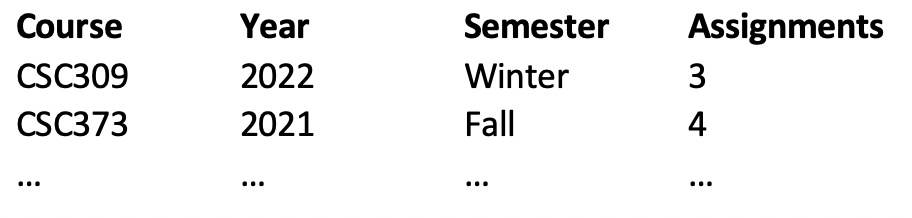
Note that your HTML file must NOT contain any style or scripts, either inline or from a file (except for the style.css file you will create in the next question). Any text surrounded by double quotations must be exactly copied to your file, as the auto tester will run a case-sensitive check.
Important: make sure that you validate your file before submitting it. The tester might not work properly if your file is malformed.
Complement your HTML file with a stylesheet named style.css that fulfills the following requirements
- Make the previous <div> section always stick to the top of screens as they scroll. That is, it should remain on top of the page no matter how much the user has scrolled down. No space to the top, left, or right. Also, set its background color to aqua.
- Fit the unordered list in one line. Put at least a 5% margin to the left and right of each item.
- Use Roboto Regular 400 as the font for the entire HTML document.
- Round the corner of the multi-line box with 5px radius. Also, the cursor should switch to grab when it hovers the "Send Feedback" button.
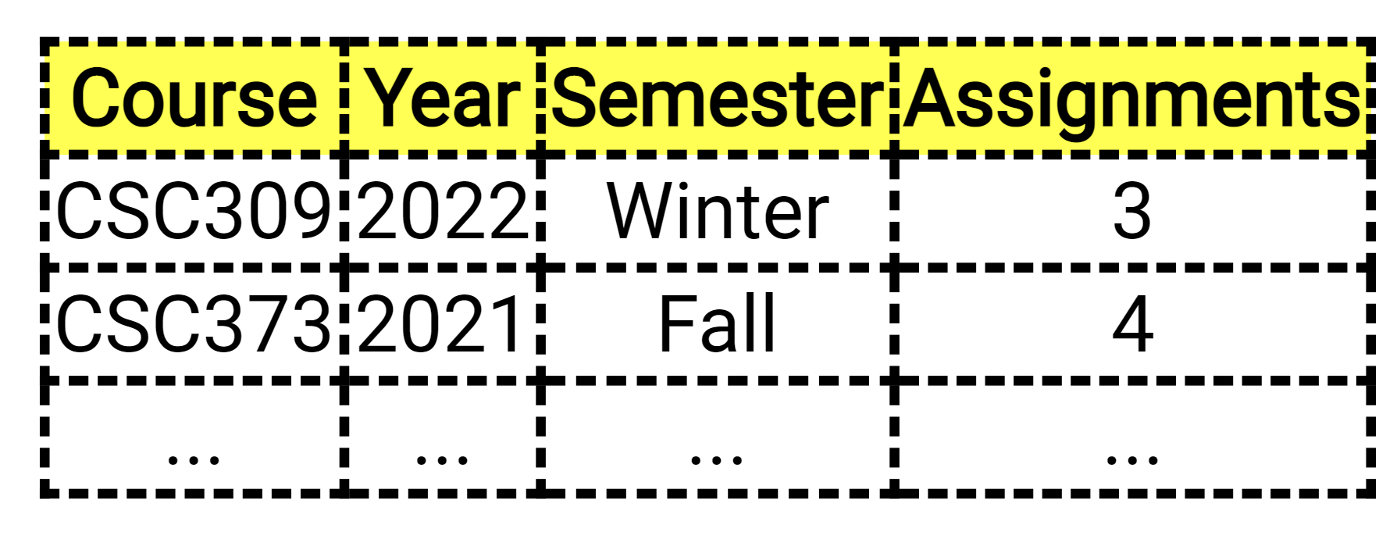
- Make the previous table look like this. Pay attention to the background color, text alignment, and borders.
- Re-arrange your page into a two-columned grid layout. The left column contains everything except the "Hello Visitors!" <div>, the footer, and the embedded file. The right column belongs to the embedded file. Both columns should occupy the same portion of the page's width.
- Make everything inside the HTML file center-aligned. That includes all grid content, the header, and the footer.
- Put a reasonable margin between elements so that they will not overlap or fall too close to each other.
For your help, you can refer to the below screenshot as what your final submission should look like to receive the full marks.

Comments
This is my fourth time taking CSC309, and inarguably, this is the best assignment I've ever seen.
Problems are so accurately designed that anyone with their own knowledge and experience have their own takeaways.
I hope next assignments will be this good, too!
Thanks bro!