<?xml version="1.0" encoding="UTF-8" standalone="yes"?>
<?xml-stylesheet href="http://www.blogger.com/styles/atom.css" type="text/css"?>

<feed xmlns="http://purl.org/atom/ns#" version="0.3" xml:lang="en-US">
<link href="http://www.blogger.com/atom/7542316" rel="service.post" title="Firefox and Google" type="application/atom+xml"/>
<link href="http://www.blogger.com/atom/7542316" rel="service.feed" title="Firefox and Google" type="application/atom+xml"/>
<title mode="escaped" type="text/html">Firefox and Google</title>
<tagline mode="escaped" type="text/html">How to improve Google for Firefox users. By &lt;a href="http://www.cs.toronto.edu/~james"&gt;David James&lt;/a&gt;</tagline>
<link href="http://www.cs.toronto.edu/~james/firefox" rel="alternate" title="Firefox and Google" type="text/html"/>
<id>tag:blogger.com,1999:blog-7542316</id>
<modified>2005-05-29T08:06:39Z</modified>
<generator url="http://www.blogger.com/" version="5.15">Blogger</generator>
<info mode="xml" type="text/html">
<div xmlns="http://www.w3.org/1999/xhtml">This is an Atom formatted XML site feed. It is intended to be viewed in a Newsreader or syndicated to another site. Please visit the <a href="http://help.blogger.com/bin/answer.py?answer=697">Blogger Help</a> for more info.</div>
</info>
<entry xmlns="http://purl.org/atom/ns#">
<link href="http://www.blogger.com/atom/7542316/111729871098265594" rel="service.edit" title="Bold AutoLinking using GreaseMonkey" type="application/atom+xml"/>
<author>
<name>David James</name>
</author>
<issued>2005-05-28T12:33:00-04:00</issued>
<modified>2005-05-28T19:47:45Z</modified>
<created>2005-05-28T16:45:10Z</created>
<link href="http://www.cs.toronto.edu/~james/firefox/2005/05/bold-autolinking-using-greasemonkey.html" rel="alternate" title="Bold AutoLinking using GreaseMonkey" type="text/html"/>
<id>tag:blogger.com,1999:blog-7542316.post-111729871098265594</id>
<title mode="escaped" type="text/html">Bold AutoLinking using GreaseMonkey</title>
<content type="application/xhtml+xml" xml:base="http://www.cs.toronto.edu/~james/firefox" xml:space="preserve">
<div xmlns="http://www.w3.org/1999/xhtml">
<a href="http://www.squarefree.com/2005/05/22/autolink/">Jesse Ruderman's AutoLink user script</a> for Firefox is quite a handy tool. It turns simple plain text URLs and emails from web pages into real links. So you can just click on the link instead of copying and pasting it into the URL bar.<br/>
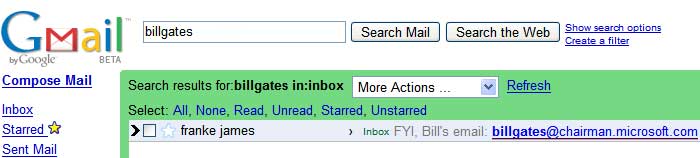
<br/>AutoLink is a great tool, but it could be better. Here's an example. If I'm trying to remember a friend's email address, I often type in the person's name into my <a href="http://gmail.google.com/">gmail</a> search box. For my good friend <a href="http://www.microsoft.com/billgates/">Bill</a>, here's what should pop up:<br/>
<br/>
<a href="mailto:billgates@chairman.microsoft.com">
<img border="0" src="http://www.cs.toronto.edu/%7Ejames/firefox/images/gmail.jpg"/>
</a>
<br/>
<br/>With AutoLink, emailing Bill is as easy as a single click. No need for tedious copying and pasting.<br/>
<br/>Unfortunately, because Gmail has highlighted Bill's email in bold, Jesse's AutoLink gets confused by the extra tags in the middle of the link. As a result, that handy link doesn't appear. To fix this, I've rewritten the search routine of AutoLink to skip over bold tags and other similar formatting tags.<br/>
<strong>
<br/>Installation Instructions</strong> <ol> <li>Install <a href="http://www.getfirefox.com/">Firefox</a> and <a href="http://greasemonkey.mozdev.org/">the GreaseMonkey Extension</a>
</li>
<li>Right click <a href="http://www.cs.toronto.edu/%7Ejames/firefox/scripts/autolink.user.js">here</a>, and select 'Install User Script'</li> </ol> You can also take a look at the <a href="http://www.cs.toronto.edu/%7Ejames/firefox/scripts/autolink.user.js">raw source code</a>, if you like.</div>
</content>
</entry>
</feed>