University of Toronto
CSC148S--Introduction to
Computer Science, Spring 1997
Assignment 1:
Appointment Calendar
Due : Thursday, February 6th at 6:00 p.m., in the 148 drop boxes
This assignment is worth 12 marks towards your grade in this course.
Purpose
The main purpose of this assignment is to provide experience using modules
and pointers. It also provides the opportunity of seeing that information
can be stored and manipulated in different ways and that different methods
may be more appropriate in different situations.
Introduction
Electronic appointment calendars are popular at the moment. You will
examine two methods of implementing such a calendar. The first method
uses an array, the second linked lists.
The calendar manages a working week's, i.e. five days', appointments, from
the current day to four working days from today. The calendar has the
following operations: load calendar, save calendar, book appointment, fit
appointment, find appointment, cancel appointment, view day, view week,
clear day, clear week and next day.
Each appointment has a
name, start and finish time, and may be ``fixed'' or unfixed. A
fixed appointment, once booked, cannot have its start and
finish times
changed. The start and finish times of an unfixed appointment can change
but the duration cannot. That is, after an unfixed appointment is booked,
it
can be moved ahead or back to accommodate the booking of a new
appointment.
Array implementation
This implementation uses a two dimensional array of records. Each
location in the array
represents a 30 minute period. The array has 16 rows for the different
time
slots, and 5 columns for the different days. The rows represent the
following time slots: 9 am-9:30, 9:30-10, ... 4 pm-4:30, 4:30-5.
Each
record can store the information associated with a single appointment. For
time slots with no appointment scheduled, the record stores an empty
string in the name field.
While the rows of the array represent half hour time slots, note that the
array records
include fields for start and finish times; this allows appointments that
do not
start or finish exactly on the hour or half hour.
If an appointment uses part or all of more than one slot,
then its information is stored in several identical records,
stored in each slot that it uses part of.
For example, an appointment, ``Research'' that starts at 9:15 and
finishes at 10:15, would be represented by three identical records
(each with start time 9:15 and end time 10:15)
stored in the 9-9:30,
9:30-10 and 10-10:30 locations in the array.
Linked list implementation
Each day's appointments are stored in a linked list of appointment
records, ordered by the time of the appointment. There is a
header list, stored as an array of five pointers,
with one pointer for each day in the calendar.
A header
pointer points to the linked list of appointments for that day.
Each list of appointments includes a ``dummy'' record at the beginning
and end. These records do not represent actual appointments. They are
there because they simplify the code, reducing
the necessity for special cases at the beginning and end of the lists.
Exercise (not to be handed in): A sample file of appointments is
available on the web page.
For each of the two data structures, draw how it would look when storing
these appointments.
Architecture of the program
We have started a program that solves this problem. It is
divided into several files which are available on the
course web site.
The program includes several modules along with the main program. The
major parts are:
- module ApptCalendar: This module stores and manipulates the
data
structure that stores the appointment calendar. There are two different
versions: the array version and the linked
list version.
- module TimeModule: This module contains subprograms used to
manipulate
time
values.
- module Queue: This module implements the queue abstract data
type
(see BHH 6.1-6.2 or Standish 7.3). You will need to use a queue when
implementing the view operations (see below).
- main program: The main program implements the user interface
and
interacts with the modules.
Our program includes the user interface, and the operations that load the
calendar with any appointments stored after a previous run,
write the appointments out to a file,
book appointments, cancel appointments,
clear a day, and clear a week.
The other operations are not implemented.
Your assignment
For both implementations, you must write the missing operations. You
may complete the
assignment in any order. For example, you may want
to complete the
missing operations
in the array implementation first, then continue
with the linked list implementation.
While you are
making your additions to the program, think about the advantages and
disadvantages of
each implementation, and about your testing strategy.
You must not change the code that is provided. Just make the additions
that are listed below. In particular, do not change the module
signatures!
Part A
Write the view day and view week operations for both implementations. The
view day operation prints all the information for appointments for a
specified day. The appointments should appear in table form, with a
row for each time slot and a
column for each field: appointment name, start time, and finish time.
The view week command prints a week's appointments in a table,
with a row for each time slot and five columns for days. To reduce the
size of the
display table, only the appointment names are printed.
With the linked list implementation, it is possible to schedule several
short
appointments that occur in a single time slot. But several
appointments cannot be displayed within one spot in the display table.
Here is how to address this problem. Whenever more than one appointment
occurs in a time slot, print a footnote marker in the table (*1, *2,
*3, etc.), and display the appointment information as a footnote below the
table.
You will need to remember which appointments need to be printed in footnotes
because they cannot be printed until after the whole table is printed.
(Why?) To do this, use the queue module to store a queue of footnotes to
be printed. With each footnote in the queue, store
the marker you printed in the table
(so you can repeat it below the table as a cross reference).
Not all details regarding the exact appearance of the display have
been specified. Your solution must stay within the constraints described
above, but other design choices are up to you.
If you are concerned that you are straying outside the acceptable limits,
discuss your output format with your instructor or TA.
Part B
Write the fit appointment operation for both implementations. This
operation must find a period of time that a given appointment will fit
into. If
there is no continuous period of time large enough to accommodate this
appointment, previously booked
appointments that are not fixed can be pushed forward or back to
create a period that will accommodate this appointment.
However, the order of all
previously booked appointments cannot change and no fixed appointments
can move. If enough time is found to satisfy this appointment, it is
booked and
the start and finish times are returned. Otherwise the fact that the
appointment will not fit is reported and the calendar remains unchanged.
Part C
Implement the next day command for both implementations. This operation
changes the current day to the next working day and clears the now
previous day's appointments. The calendar can now accept bookings of
appointments four working days from the new current day.
Part D
Improve the comments and add preconditions to the subprograms that are
defined in the
Time module. Your preconditions should specify the conditions that must
be met for the subprogram to work correctly,
i.e., to work as stated in the comments.
Part E
For this assignment, you will not write a
a full report as described the Course Handbook.
Your report will contain only two things:
a section describing your testing strategy,
and a ``Bugs and
Missing Features'' section.
Here you should list any problems that you were unable to
solve, and any parts of the assignment that you were unable to complete.
Even if you consider your assignment complete and problem free, you must
include this section and state that there are no bugs or omissions.
Optional Bonus
If you have completed the text based version of the assignment and want an
extra challenge, consider replacing the text based interface with a
graphical interface, using mouse-based input with buttons for the
different commands, and dialog boxes for the input of appointment
information. Do not change the appointment calendar module to accommodate
your graphical interface modifications.
The bonus will be considered for extra points only if you also hand in a
text based
version that is complete and thoroughly tested.
Do not get carried away with the bonus problem. You probably
have other courses and responsibilities that need your
attention.
How to hand in your assignment
This assignment is to be handed in on paper.
If you have done the optional bonus,
you will also hand in a diskette.
Hand in the following:
- For parts A, B and C, hand in a printout of your two
versions of the ApptCalendar
(clearly highlight your additions with a distinctive marker)
and a thorough set of test runs.
For each test run, hand in
annotated printouts of your initial calendar
data, the input file (containing commands from the user),
the resulting output, and newly-stored calendar data file.
- For part D, hand in a printout of the Time module body, with
your improved preconditions and comments.
- For part E, hand in your report.
- For the bonus, hand in a printout of your main program file that
includes your new code.
In addition, hand in a diskette
containing only:
a single copy of
the program files for this assignment, and
one sample file of initial appointments.
Include just the array version of the calendar module.
Your main program must be called main.t or main.c, as appropriate.
If you do not follow these instructions,
you will forfeit any bonus marks.
- Fill in the cover sheet and attach it securely to the
outside of the envelope containing
your assignment.
Caution: Don't expect your marker to go searching for parts of your
solution. Clearly label all parts of the assignment and highlight your
additions.
Some advice
When reading the code that we have provided, focus first on the
interface to each module. Ideally you should be able to use a module
without looking at its implementation details.
Once you understand the program,
develop a description of your solution in English.
Test the logic of your solution on paper and make any corrections.
Only then translate the solution into code.
How your assignment will be marked
Unlike assignment 0, this assignment will be marked by a human. This
means that your code will be graded for style, comments,
design, and adequacy of testing; just ``working
properly'' is not enough
for your program to earn full marks.
It is your job, in your testing, to provide evidence that will convince
the marker that your program works. If you hand in no test runs, or poor
testing, you will get few or no marks for correctness.
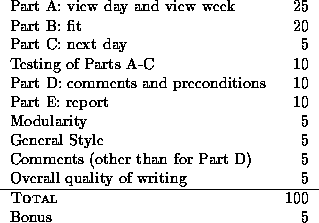
Below is the tentative marking scheme for the assignment. Use it to gauge
where to focus your efforts.
Diane Horton
Sun Jan 26 13:29:37 EST 1997