Docker
We will run through the Docker Tutorial, only adapted for our setup at UTM.
Containers (From the Docker Tutorial...)
 Flexible: Even the most complex applications can be containerized.
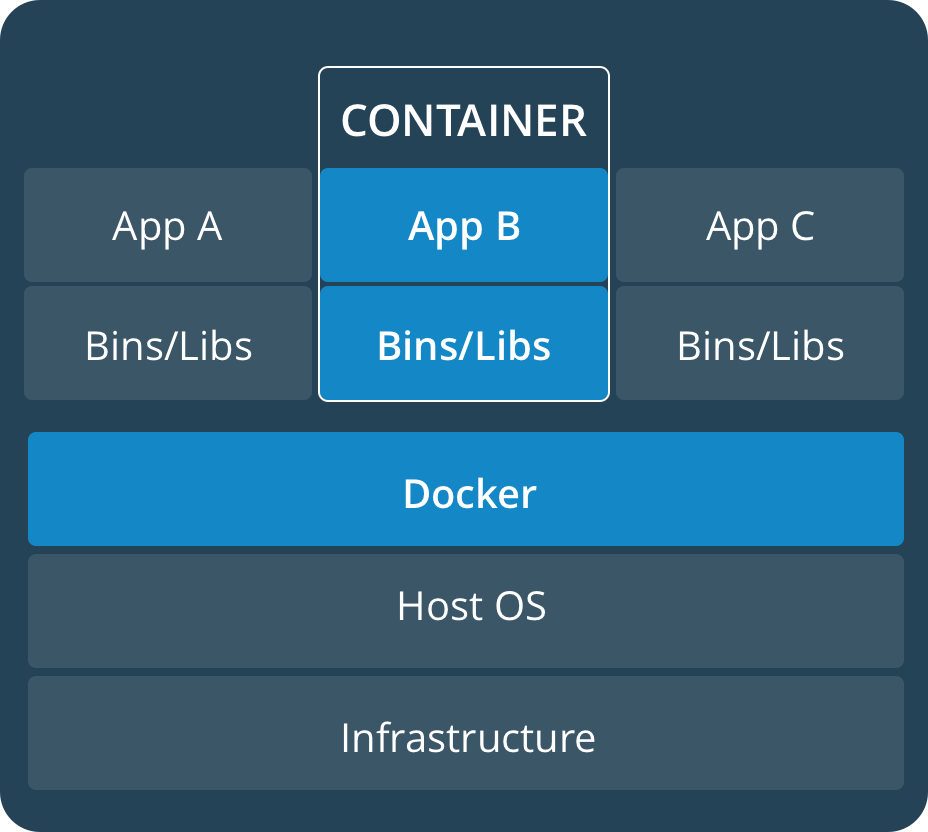
Lightweight: Containers leverage and share the host kernel.
Interchangeable: You can deploy updates and upgrades on-the-fly.
Portable: You can build locally, deploy to the cloud, and run anywhere.
Scalable: You can increase and automatically distribute container replicas.
Stackable: You can stack services vertically and on-the-fly.
Flexible: Even the most complex applications can be containerized.
Lightweight: Containers leverage and share the host kernel.
Interchangeable: You can deploy updates and upgrades on-the-fly.
Portable: You can build locally, deploy to the cloud, and run anywhere.
Scalable: You can increase and automatically distribute container replicas.
Stackable: You can stack services vertically and on-the-fly.
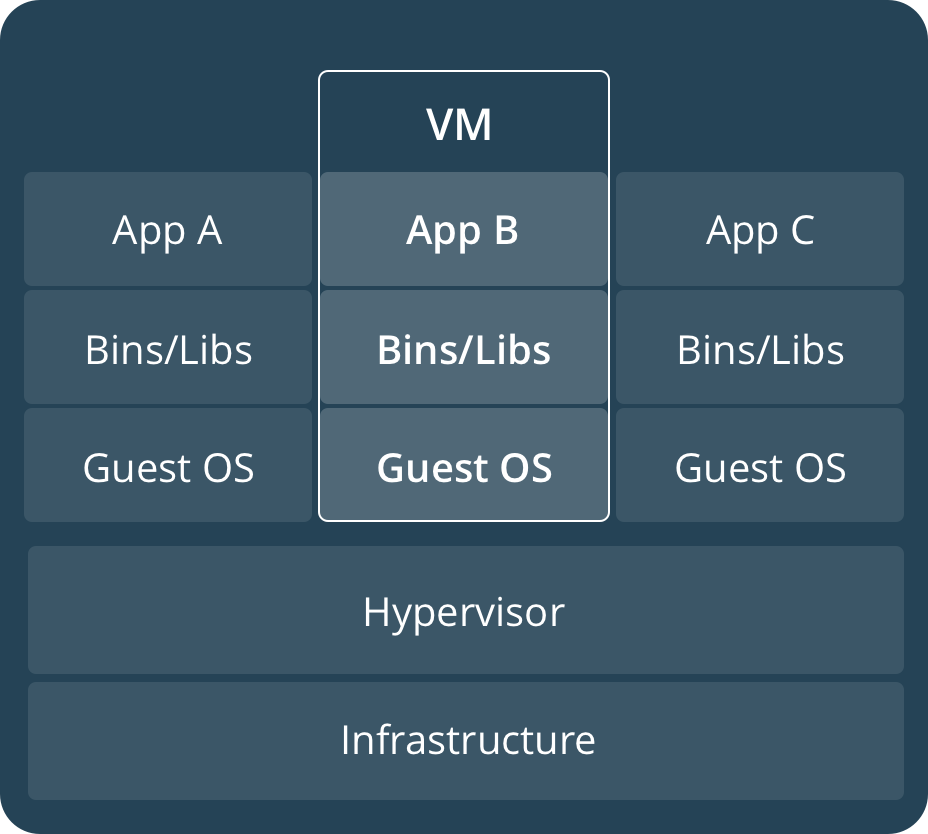 Containers run as processes on host, shares the OS. VM has own OS. Containers are much more light weight.
Definitions
- Dockerfile: a config file describing how to build an image.
Start with base system, describe what to install, how to configure.
- Image: an executable package that includes everything needed to run an application--the code, a runtime, libraries, environment variables, and configuration files. Can be stored and accessed from central repos. They are stateless!!!
- Container: Take an image, download it (it's basically just a config file), then execute it, then run it.
Images can run on any docker host. You just install docker and then run the image. No need to
configure the host with specifics for the application. They are stateless!!! Shut it down, loose all data!!!
- Service: In terms of Distributed Computing, this is the Replicated code. Basically,
a config file which describes how to replicate an image, so that it runs as many containers
on a cluster.
- Stack: A collection of services that together make up an application. In terms of Distributed Computing,
this is Partitioned code.
- Image: an executable package that includes everything needed to run an application--the code, a runtime, libraries, environment variables, and configuration files.
- Container: a runtime instance of an image--what the image becomes in memory when executed (that is, an image with state, or a user process)
- Images can be stored in repos (for example docker repos) to be called up by any docker host.
Setup at UTM
- Login to lab machines 3,6,9,12,15,18,21,24,27
- ssh student@localhost -p 2222
- If you logged into dh2026pcX you will have access to dh2026pcX, X+1 and X+2 with IP addresses 10.11.12.X, 10.11.12.X+1 and
10.11.12.X+2
- Check that docker is installed
docker --version
docker info
docker run hello-world
docker image ls
docker container ls --all
Building an image
- A Dockerfile is a config file which describes how to build an image.
- Make a new directory and place the following in it... Dockerfile, requirements.txt, app.py
- docker build -t friendlyhello . # build the image and tag it
- docker image ls
Running an image (a running image is a container)
- docker run -p 4000:80 friendlyhello
- curl http://localhost:4000 or bring up firefox and go to http://localhost:4000
- docker run -d -p 4000:80 friendlyhello
- docker container ls
- docker container stop XXXXXXXXXXXXXXX
Sharing an image
- You share an image so that others can download and play with it, use your image as components
in a larger system. Also so that you can pull down and run images on your own cluster.
- Sign up with hub.docker.com
- docker login
- docker tag friendlyhello USERNAME/get-started:part2 # docker tag image username/repository:tag
- docker image ls
- docker push username/repository:tag # publish the image
- Now, on any docker machine you can
docker login
docker run -p 4000:80 username/repository:tag
Try this on your other docker hosts.
REPLICATION: A service is running copies of a container.
Configuring a service
Running a Service
- docker swarm init
In our case, you will have to ...
docker swarm init --advertise-addr 10.11.12.XXX
- docker stack deploy -c docker-compose.yml getstartedlab
- docker service ls
- docker service ps getstartedlab_web
- docker container ls -q
- curl -4 http://localhost:4000 # execute repeatedly to see different containers reply
Load Balanced Proxy
- Note that there is a load balance reverse proxy placed on top of the applications!!
Controlling the App (scale, stop, leave the swarm)
- Modify docker-compose.yml, change replicas
- docker stack deploy -c docker-compose.yml getstartedlab # note we did not have to stop and re-start
- docker service logs getstartedlab_web
- docker service ls
- docker stack rm getstartedlab # stop the app
- docker swarm leave --force
Swarms
- Swarm = one swarm manager + many workers (manager can be a worker)
- Swarm controlled by manager
- Node is host that is part of the swarm
Creating a Swarm
NOTE: We are not using Docker Machine here!!!!
- docker swarm leave --force
- docker swarm init
- Copy the "docker swarm join --token ..." line to your other hosts (X+1, X+2). Make sure you reference
the correct IP. You will need to ssh into port 2222 on your other machines.
- Now you have 3 nodes, 1 manager and 3 workers. So far no containers deployed.
Deploying a Stack into a Swarm
- docker stack deploy -c docker-compose.yml getstartedlab # run this on manager
- docker stack ps getstartedlab
- curl -4 http://localhost:4000 # execute repeatedly to see different containers reply
- docker stack rm getstartedlab # Swarm still has the same Nodes, workers, manager
Restarting
- login to 3n,3n+1,3n+2 lab systems using your utorid
- login to vm on each of the systems
- docker swarm leave --force
- List all exited containers:
docker ps -aq -f status=exited
- You can start a stopped container using ...
docker container start CONTAINER_ID
- Remove all containers/services
docker rm -f $(docker ps -a -q)
docker service rm $(docker service ls -q)
- Remove all stopped containers:
docker ps -aq --no-trunc -f status=exited | xargs docker rm
- Use --rm with docker build, when re-building containers
- To rm existing images ...
docker image ls
docker image rm CONTAINER_ID
- To clean the system
docker system prune -a -f
PARTITION: Stack is a collection of services that comprise the application.
You can think of the different types of services as partitioning the application.
docker swarm init # may complain that you are already part of a swarm, or ask about --advertise-addr
docker swarm leave --force # on all of your hosts
docker swarm init --advertise-addr 10.11.12.X # on the master only!!
# Why the --advertise-addr? Ans: two interfaces in the lab
# Keep the join line!!!
Configuring a Stack
Deploying the Stack locally
-
docker stack deploy -c docker-compose2.yml getstartedlab2
docker stack ls
docker stack ps getstartedlab2
- On the host, launch a browser and take a look at 127.0.0.1:4000 and 127.0.0.1:8080
Deploying the stack on other hosts (adding nodes)
- Go X+1 and X+2 and enter the join line
- Now re-deploy the stack
docker stack deploy -c docker-compose2.yml getstartedlab2
docker stack ls
docker stack ps getstartedlab2
- On the host, launch a browser and take a look at 127.0.0.1:4000 and 127.0.0.1:8080
- docker stack rm getstartedlab2
Adding state to stateless containers! Adding Persistence.
- docker-compose-3.yml
- redis service
- volumes: "/home/docker/data:/data" # mount /home/docker/data into the container at /data, must fix this
- redis-server --appendonly yes # override the default command
Deploying the Stack
docker stack deploy -c docker-compose3.yml getstartedlab3
docker stack ls
docker stack ps
- On the host, launch a browser and take a look at 127.0.0.1:4000 and 127.0.0.1:8080
- docker stack rm getstartedlab3